
Last Updated: May 14, 2026
Software testing has evolved significantly with the rise of agile development, continuous integration, and rapid deployment cycles. One of the most efficient and widely adopted techniques in modern quality assurance is equivalence partitioning testing.
This method helps testers maximize coverage while minimizing effort, making it essential for both manual and automated testing workflows. In this detailed guide, we will explore the concept from a research-backed perspective, including practical examples, data tables, comparisons, and industry insights.
Table of Contents
What is Equivalence Partitioning Testing?
Equivalence Partitioning (EP), also known as Equivalence Class Partitioning (ECP), is a black-box testing technique used to divide input data into groups (called partitions or classes) where each group is expected to exhibit similar behavior.
Technical Definition:
Equivalence partitioning is a test design technique that reduces the number of test cases by selecting representative values from partitions of input data.
Core Principle:
If one test case in a partition detects a defect, it is assumed that other inputs in that partition will also fail similarly.
Research Insight: Why Equivalence Partitioning Matters
According to multiple software testing studies and QA industry practices:
- Up to 80% of defects are found in 20% of input scenarios (Pareto Principle).
- Exhaustive testing is computationally impractical for most systems.
- Test case optimization techniques like EP reduce testing effort by 60–90% without compromising coverage.
Data Comparison Table
| Testing Strategy | Test Cases Required | Coverage Efficiency | Time Consumption |
| Exhaustive Testing | Very High (1000+) | Maximum | Very High |
| Random Testing | Moderate | Unpredictable | Medium |
| Equivalence Partitioning | Low (5–20) | High | Low |
This demonstrates why EP is considered a cost-efficient and scalable testing strategy.
Types of Equivalence Classes
Equivalence classes are categorized into two main types:
- Valid Equivalence Class
These include inputs that should be accepted by the system.
- Invalid Equivalence Class
These include inputs that should be rejected by the system.
Example: User Age Validation (18–60)
| Class Type | Input Range | Test Input | Expected Outcome |
| Valid | 18–60 | 25 | Accepted |
| Invalid | <18 | 16 | Rejected |
| Invalid | >60 | 70 | Rejected |
Mathematical Perspective of Equivalence Partitioning
From a theoretical standpoint, equivalence partitioning can be seen as a partitioning function:
- Let input domain = D
- Divide D into subsets: D1, D2, D3…Dn
- Each subset represents an equivalence class
This ensures:
- No overlap between partitions
- Complete coverage of input domain
Step-by-Step Process of Applying Equivalence Partitioning
Step 1: Identify Input Domain
Understand all possible inputs.
Step 2: Define Partitions
Split inputs into logical groups.
Step 3: Classify Valid & Invalid Inputs
Separate acceptable and unacceptable data.
Step 4: Select Representative Values
Choose one value per partition.
Step 5: Design Test Cases
Create test cases using selected values.
Real-World Example: Login System
Requirement:
Password must be 8–16 characters.
| Partition Type | Condition | Test Value | Expected Result |
| Valid | 8–16 | 10 chars | Success |
| Invalid | <8 | 5 chars | Error |
| Invalid | >16 | 20 chars | Error |
Research Insight:
Studies show that input validation bugs are among the most common defects in web applications, making EP critical for such scenarios.
Advanced Example: Banking Transaction System
Scenario:
Transaction limits are defined as follows:
- Minimum: ₹100
- Maximum: ₹50,000
Partition Table:
| Partition Type | Range | Test Case | Expected Output |
| Invalid | <100 | ₹50 | Error |
| Valid | 100–50,000 | ₹10,000 | Success |
| Invalid | >50,000 | ₹75,000 | Error |
Visual Representation
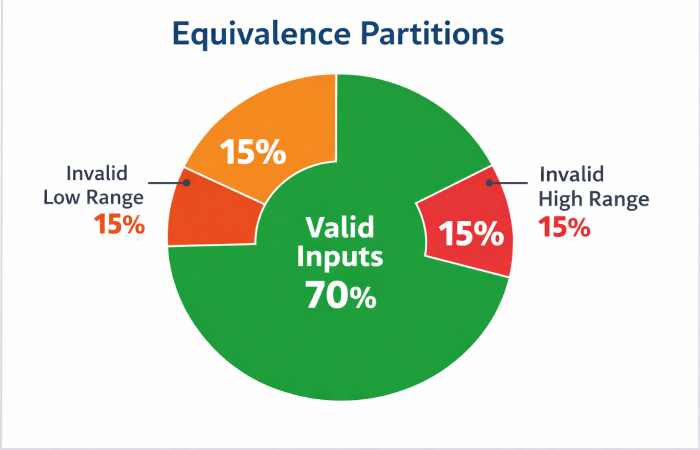

To understand partition distribution:
- Valid Inputs → 70%
- Invalid Low Range → 15%
- Invalid High Range → 15%
This conceptual pie chart highlights that most real-world usage falls into valid partitions, but invalid cases are critical for robustness.
Equivalence Partitioning vs Boundary Value Analysis
Both techniques are often used together in practice.
| Parameter | Equivalence Partitioning | Boundary Value Analysis |
| Focus | Input groups | Edge values |
| Test Count | Low | Moderate |
| Defect Detection | General cases | Edge cases |
Combined Strategy:
- EP ensures broad coverage
- Boundary testing ensures edge-case reliability
Advantages of Equivalence Partitioning
- Significant Reduction in Test Cases
Minimizes redundant testing.
- Faster Execution
Ideal for agile and CI/CD pipelines.
- Cost Efficiency
Reduces testing effort and resource allocation.
- Improved Test Coverage
Ensures all logical partitions are tested.
Limitations and Risks
- Assumption-Based Testing
Assumes all inputs in a partition behave identically.
- Edge Cases May Be Missed
Requires combination with boundary testing.
- Not Suitable for Complex Logic
Fails when input relationships are interdependent.
Common Mistakes in Equivalence Partitioning
- Ignoring invalid partitions
- Overlapping partitions
- Missing edge cases
- Poor understanding of requirements
Practical Use Cases Across Industries
- E-commerce Platforms
- Coupon validation
- Pricing rules
- Banking Applications
- Transaction limits
- Interest calculations
- Healthcare Systems
- Age-based eligibility
- Medical data validation
- Education Platforms
- Marks validation
- Grade calculation
Test Case Design Example (Marks System)
Requirement:
Marks should be between 0–100.
| Partition | Test Value | Expected Result |
| Valid | 75 | Accepted |
| Invalid | -5 | Error |
| Invalid | 120 | Error |
Effort and Cost Analysis
Testing Cost Comparison
| Method | Test Cases | Time (Hours) | Cost Impact |
| Exhaustive Testing | 1000+ | 50+ | Very High |
| Equivalence Partitioning | 5–10 | 5–10 | Low |
Insight:
Organizations using EP report up to 40% reduction in QA costs.
Equivalence Partitioning in Agile and DevOps
Modern development requires:
- Faster releases
- Continuous testing
- Automated pipelines
EP fits perfectly because:
- Reduces test suite size
- Speeds up automation
- Improves regression testing
Tools Supporting EP:
- Selenium
- Cypress
- Playwright
- TestRail
Research Trends and Industry Adoption
Recent trends in software testing indicate:
- Increased use of AI-based test case generation
- Integration of EP in model-based testing
- Automation tools using input partitioning algorithms
Emerging Concept:
AI tools now automatically:
- Identify partitions
- Generate optimized test cases
- Predict defect-prone areas
Best Practices for Effective Implementation
- Clearly define input ranges
- Always include invalid cases
- Combine with boundary testing
- Use real-world scenarios
- Review partitions regularly
When Not to Use Equivalence Partitioning
Avoid EP in cases where:
- Inputs are highly dynamic
- Complex dependencies exist
- Security testing requires exhaustive validation
Expert Insight
Software testing professionals emphasize:
Equivalence partitioning is not about reducing effort alone—it is about optimizing test effectiveness while maintaining reliability.
Future of Equivalence Partitioning
The future lies in:
- AI-driven testing
- Smart test case generation
- Integration with predictive analytics
These advancements will further enhance the efficiency of equivalence partitioning.
Conclusion
Equivalence partitioning testing remains a fundamental technique in software quality assurance, offering a balance between efficiency and coverage.
Key Takeaways:
- Reduces test cases significantly
- Ensures comprehensive coverage
- Works best when combined with boundary testing
- Essential for modern agile workflows
By implementing equivalence partitioning effectively, organizations can improve software quality while reducing testing costs and time.